.png)
BIK Product Update: October'26
This month's BIK update brings four new releases: AI Agent Builder, AI Copilot, WhatsApp Number and Voice of Shoppers. Here's a quick look at what's new, plus our playbook on when to use journeys and when to use AI agents on WhatsApp.
Welcome back to BIK – News, your monthly product update.
Build agents. Hear customers. Answer questions. Handle everything.
Four updates this month, one lets you build specialist AI agents for any support job, one turns every helpdesk conversation into customer intelligence, one handles WhatsApp usernames so no ticket goes cold, and one answers your team's "how do I" questions without a CSM ping.
Let's dive in 👇
AI Agent Builder - Build a specialist for every support job.
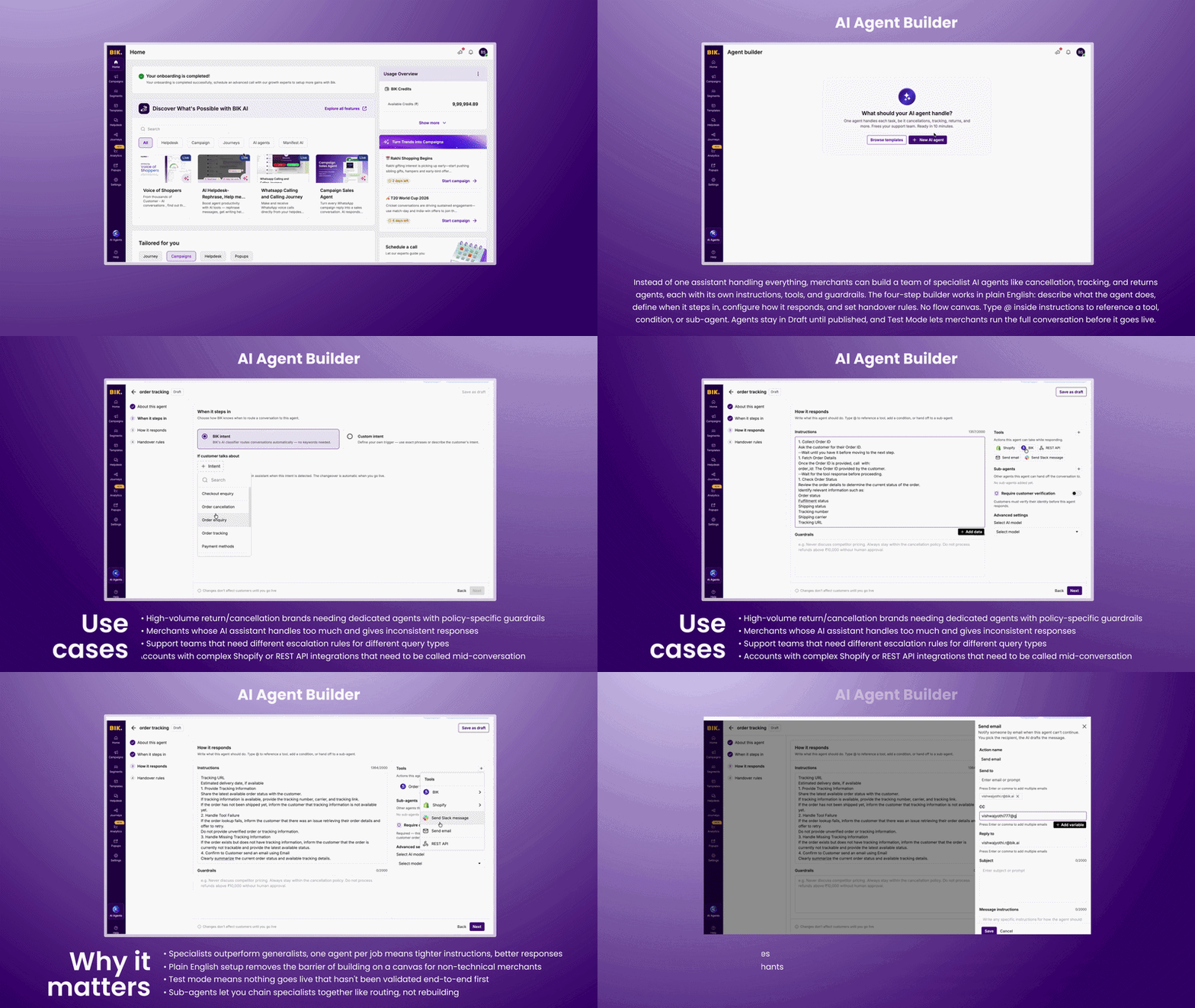
Instead of one assistant trying to handle everything, merchants can now build a team of specialist AI agents such as a cancellation agent, a tracking agent, a returns agent and each with its own instructions, tools, and guardrails. The four-step builder runs in plain English: describe what the agent does, define when it steps in, configure how it responds, set its handover rules. No flow canvas. Type @ inside instructions to reference a tool, condition, or sub-agent mid-sentence. Agents sit in draft until the merchant publishes them, and test mode lets you run the full conversation before it goes live to anyone.
Use cases:
- Brands with high return and cancellation volume who need a dedicated agent with specific guardrails per policy
- Merchants whose single AI assistant is trying to do too much and giving inconsistent responses
- Support teams that need different escalation rules for different query types
- Accounts with complex Shopify or REST API integrations that need to be called mid-conversation
Why it matters:
- Specialists outperform generalists, one agent per job means tighter instructions and more accurate responses
- Plain English setup removes the barrier of building on a canvas for non-technical merchants
- Test mode means nothing goes live that hasn't been validated end-to-end first
- Sub-agents let you chain specialists together like routing, not rebuilding
Voice of Shoppers - Hear what your customers are saying
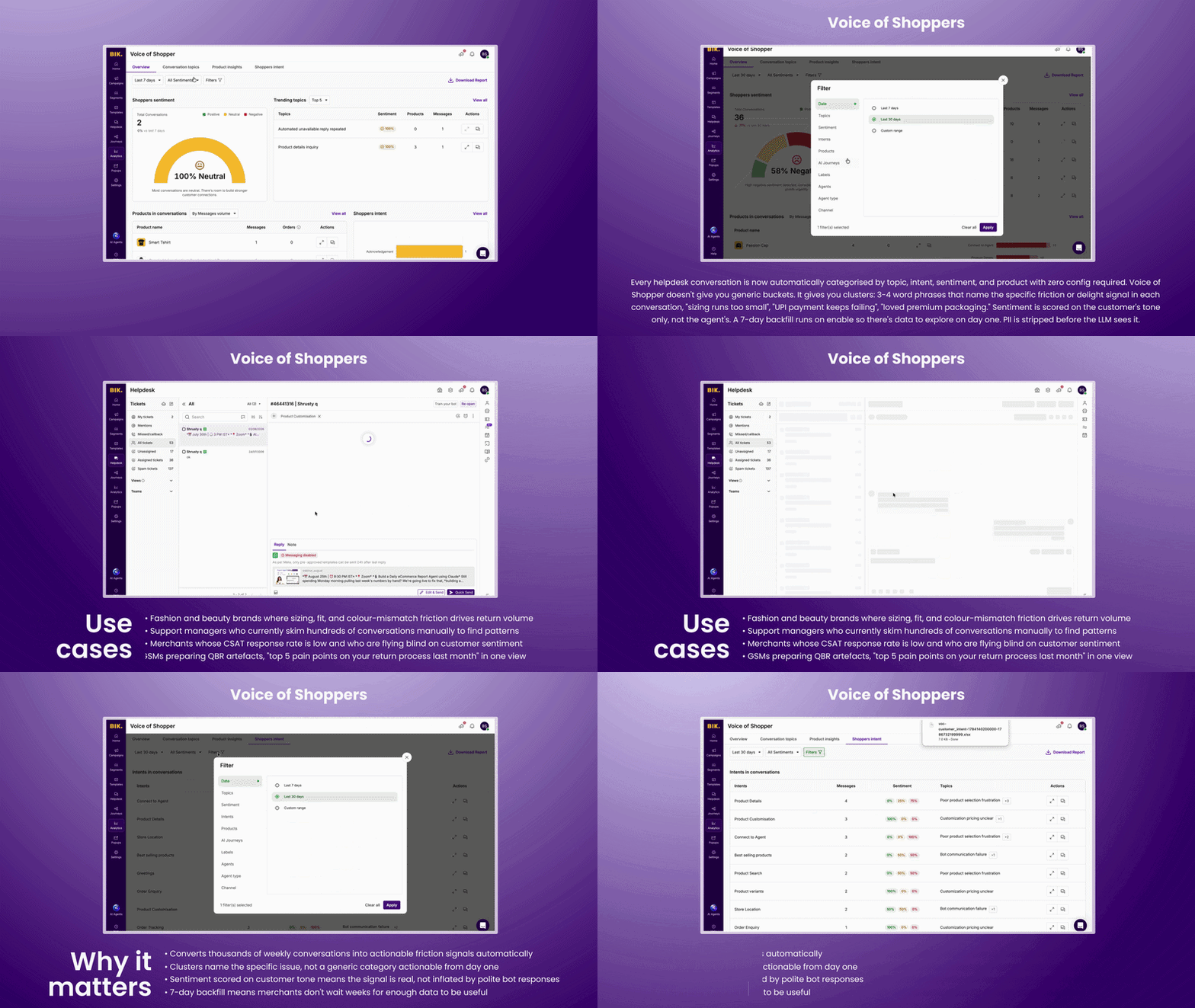
Every helpdesk conversation is now automatically categorised by topic, intent, sentiment, and product with zero config required. Voice of Shopper doesn't give you generic buckets. It gives you clusters: 3-4 word phrases that name the specific friction or delight signal in each conversation, "sizing runs too small", "UPI payment keeps failing", "loved premium packaging." Sentiment is scored on the customer's tone only, not the agent's. A 7-day backfill runs on enable so there's data to explore on day one. PII is stripped before the LLM sees it.
Use cases:
- Fashion and beauty brands where sizing, fit, and colour-mismatch friction drives return volume
- Support managers who currently skim hundreds of conversations manually to find patterns
- Merchants whose CSAT response rate is low and who are flying blind on customer sentiment
- GSMs preparing QBR artefacts, "top 5 pain points on your return process last month" in one view
Why it matters:
- Converts thousands of weekly conversations into actionable friction signals automatically
- Clusters name the specific issue, not a generic category, actionable from day one
- Sentiment scored on customer tone means the signal is real, not inflated by polite bot responses
- 7-day backfill means merchants don't wait weeks for enough data to be useful
AI Copilot in Dashboard - "How do I" questions answered on the page you're already on.
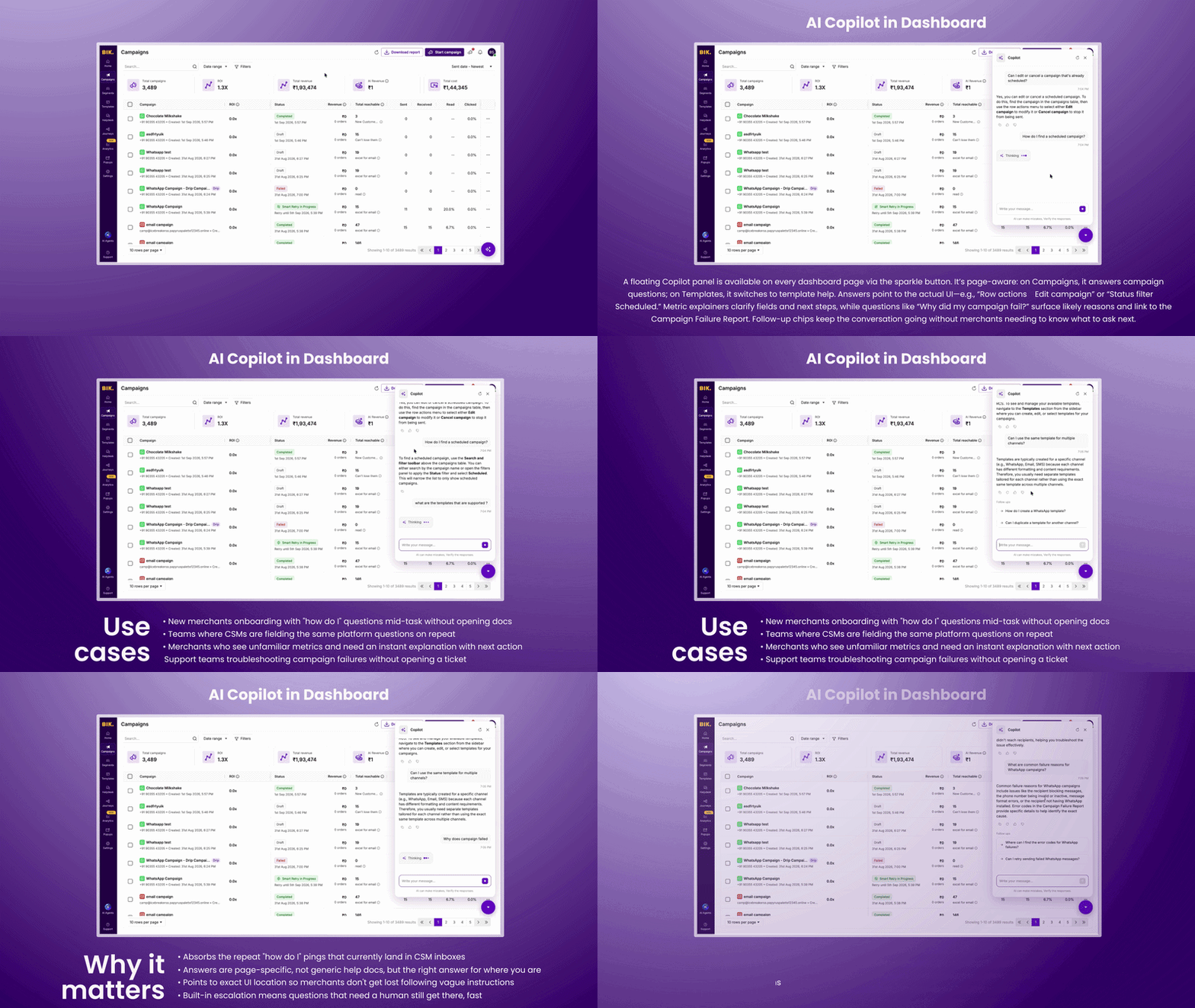
A floating Copilot panel now lives on every dashboard page, opened from the sparkle button at the bottom right. It's page-aware, open it on Campaigns and it surfaces campaign questions, open it on Templates and it switches to template questions. Answers point at the actual UI, not generic descriptions: "use the row actions menu → Edit campaign", "Status filter → Scheduled." Metric explainers tell you what a field means and what to do next. "Why did my campaign fail" returns the likely reasons and routes to the Campaign Failure Report. Follow-up chips keep the thread going without the merchant needing to know what to ask next.
Use cases:
- New merchants onboarding who have "how do I" questions mid-task without wanting to open docs
- Teams where CSMs are fielding the same platform questions on repeat
- Merchants who see unfamiliar metrics and need an instant explanation with next action
- Support teams troubleshooting campaign failures without opening a ticket
Why it matters:
- Absorbs the repeat "how do I" pings that currently land in CSM inboxes
- Answers are page-specific, not generic help docs, but the right answer for where you are
- Points to exact UI location so merchants don't get lost following vague instructions
- Built-in escalation means questions that need a human still get there, fast
Spin the Wheel Upgrades - Your incentive strategy.
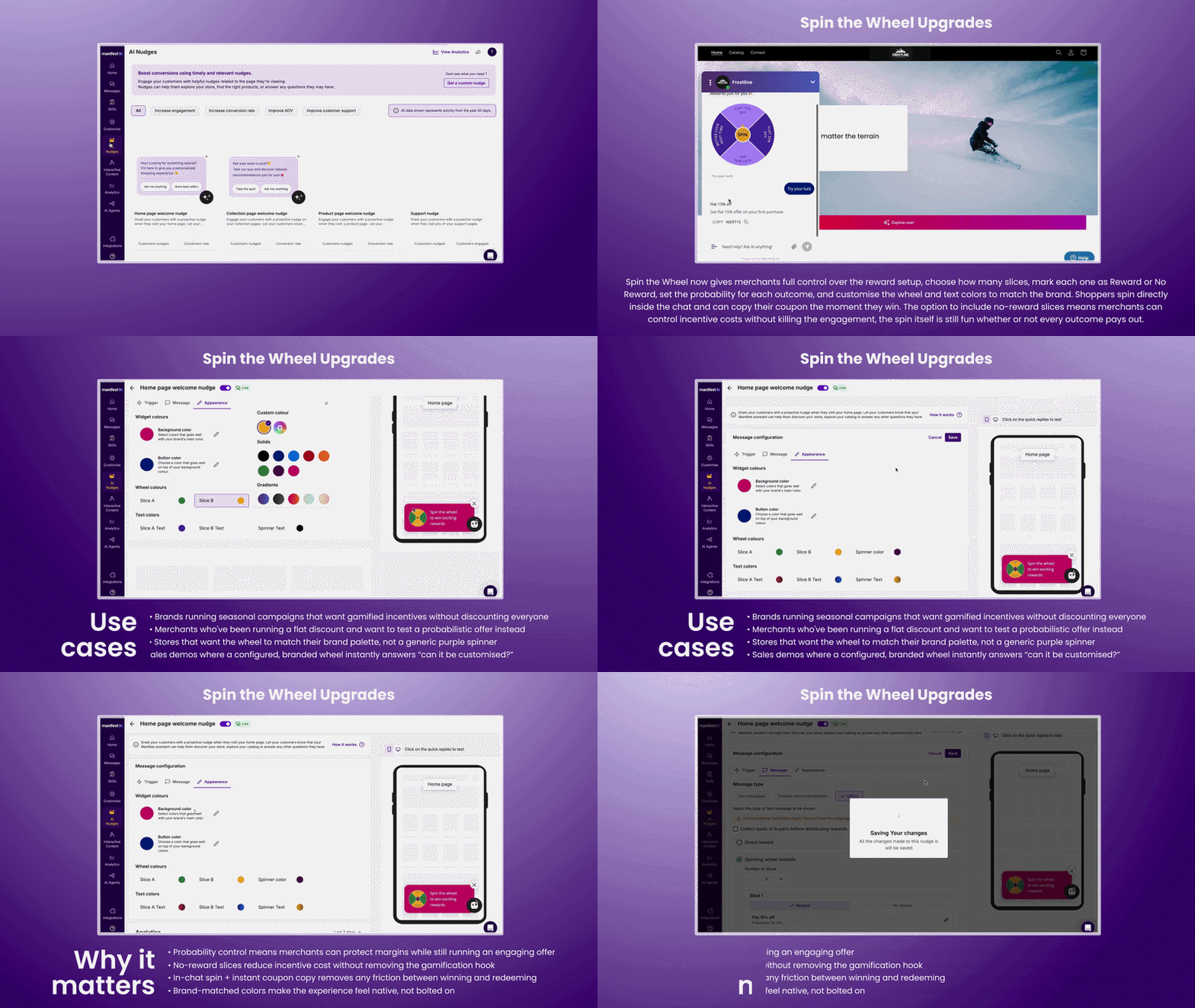
Spin the Wheel now gives merchants full control over the reward setup, choose how many slices, mark each one as Reward or No Reward, set the probability for each outcome, and customise the wheel and text colors to match the brand. Shoppers spin directly inside the chat and can copy their coupon the moment they win. The option to include no-reward slices means merchants can control incentive costs without killing the engagement, the spin itself is still fun whether or not every outcome pays out.
Use cases:
- Brands running seasonal campaigns who want a gamified incentive without giving discounts to everyone
- Merchants who've been running a flat discount and want to test a probabilistic offer instead
- Stores that want the wheel to match their brand palette, not a generic purple spinner
- Sales demos where showing a configured, branded wheel closes the "can it be customised?" question instantly
Why it matters:
- Probability control means merchants can protect margins while still running an engaging offer
- No-reward slices reduce incentive cost without removing the gamification hook
- In-chat spin + instant coupon copy removes any friction between winning and redeeming
- Brand-matched colors make the experience feel native, not bolted on
More Launches this month
WhatsApp Username Support - A customer without a phone number is no longer a dead end.
WhatsApp usernames mean some customers now reach you without sharing a phone number, BIK gets a BSUID instead, and the customer panel shows up blank. Nothing about the conversation is blocked, agents can read and reply immediately. A one-click Send Contact Info template asks the customer to share their number with a single tap. When it arrives, the number saves to the profile, a new ticket is created with it attached, the old ticket closes and merges in and an AI-generated summary of the earlier conversation posts automatically so no agent has to re-read the thread.
Smarter Product Search - "Red shoes under ₹1000" should return red shoes under ₹1000.
Product search now uses an LLM to decide how to query the database for every search, whether that means an exact keyword match or an intent-led approach, depending on the query and the type of store. Price range filtering happens at query time, not after, so "red shoes under ₹1000" returns exactly that rather than a broad set that gets trimmed down. Collection-level queries are significantly more accurate. Nothing changed on the UI, the improvement is entirely backend, and it's live for every merchant now.
👋 That’s a wrap
You made it to the end - you’re now 5x more AI-savvy than you were 5 minutes ago.
Got feedback? Send us an email at help@bik.ai, we read every single message.
Until next time,
Team BIK