
WhatsApp Template Rejected? Categories, Rules and Approval Tips (2026)
How Meta classifies WhatsApp templates as marketing, utility or authentication, how automatic recategorization and misuse penalties work, the most common rejection reasons, labelled examples of approvable and rejected copy, and Meta's opt-in rules.
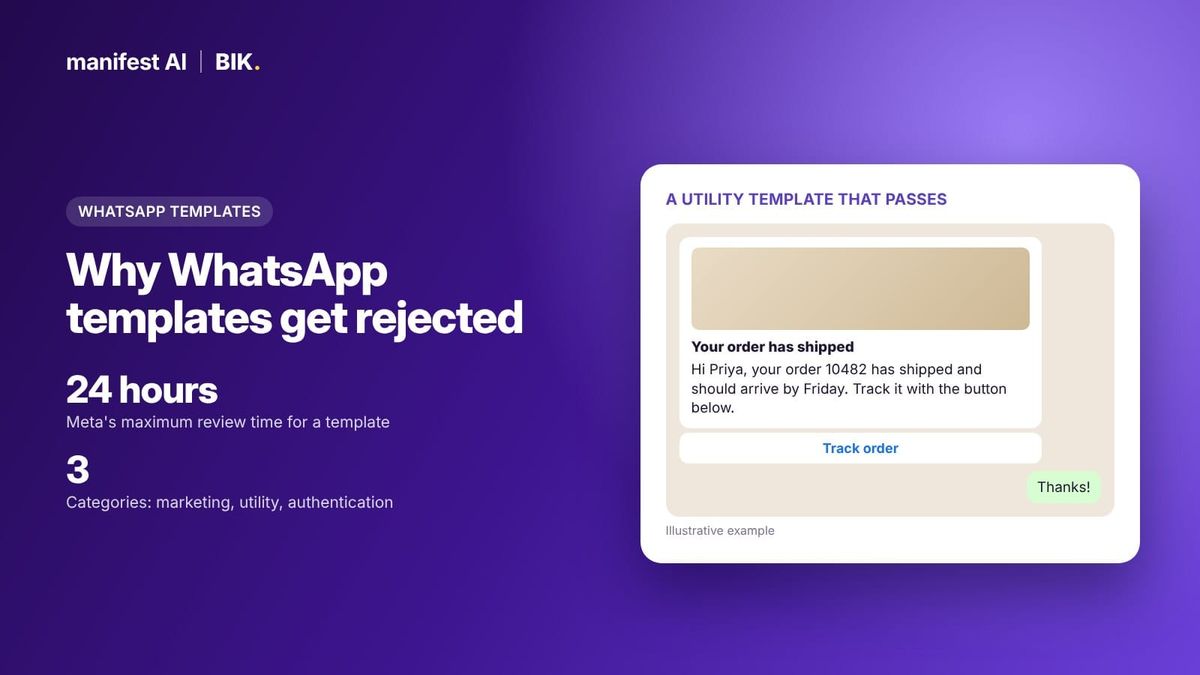
Short answer: WhatsApp templates are rejected for three main reasons: the wrong category (usually promotional copy submitted as utility), formatting errors (variables at the start or end, non-sequential or too many variables, duplicates) and policy breaches (sensitive data requests, threats, Commerce Policy violations). Meta has three categories: marketing, utility and authentication. Anything promotional, mixed or vague is marketing. Meta decides within 24 hours. BIK's template builder and pre-approved template library help you submit copy that passes the first time.

Template approval used to be a formality. Since Meta started automatically recategorizing templates in 2024 and penalising businesses that pass marketing off as utility, it has become a real operational risk: the wrong category changes your price, and repeated misuse can restrict your account. This guide explains how Meta classifies templates, why it rejects them, what approvable copy looks like next to copy that gets rejected, and what Meta requires for opt-in.
The three WhatsApp template categories
| Category | What it is for | Ecommerce examples | Key rules |
|---|---|---|---|
| Marketing | Awareness, sales, retargeting, relationship-building | Sale launches, abandoned cart reminders with an offer, back-in-stock alerts, win-back messages | Most flexible category; subject to per-user marketing limits; highest price |
| Utility | Following up on something the user did or asked for | Order confirmation, shipping update, delivery slot, refund status, a survey about a specific order | Must be non-promotional and specific to the user, or essential (for example a product recall) |
| Authentication | One-time passcodes | Login or checkout OTP | Must use Meta's authentication template with a copy-code or one-tap button; no URLs, media or emojis |
The category also sets the price. Meta bills each delivered template by category and recipient country, and marketing costs much more than utility in most markets. In India, Meta's base rate is ₹0.8631 per marketing message and ₹0.115 per utility message as of October 2026. That gap is why Meta polices the line so closely.
Marketing vs utility template: how Meta decides
Meta's categorization guidelines come down to a few rules:
- Mixed content is marketing. An order update that also promotes a product, includes a discount or asks the customer to buy again is a marketing template.
- Vague content is marketing. A template that is only a variable, or only says something like "Congratulations!", is classed as marketing because it could be used for anything.
- Utility must follow a user action. Order and account messages must not promote, upsell, cross-sell, include offers or ask for renewals.
- Surveys must be specific. A feedback request about a specific order or support interaction can be utility. A general "How are we doing?" survey cannot.
- Essential notices can be utility. Product recalls, fraud alerts, outages and privacy disclosures qualify even without a user action.
One common ecommerce trap: an abandoned cart reminder. Many brands treat it as transactional, but if it includes a discount, product recommendations or urgency copy, Meta will treat it as marketing. Submit it as marketing and price your flows accordingly.
Selling on WhatsApp? Manifest AI and BIK turn WhatsApp conversations into orders, with AI agents that answer questions, recommend products and recover carts.
Automatic recategorization and penalties
Meta does not just check the category at submission. Since 1 July 2024 it runs a recurring review of approved templates:
- Utility that should be marketing gets one day's notice, then moves to marketing and stays approved. Since 9 April 2025, utility templates that Meta decides are marketing are approved as marketing by default at submission.
- Marketing or utility that should be authentication is rejected on the first day of the following month.
- Repeat offenders lose the notice period. Since 16 April 2025, businesses already warned for misuse get no 24-hour notice before a change.
Businesses that repeatedly submit marketing content as utility face an escalating ladder:
- A warning, after which utility-to-marketing changes happen instantly.
- Rate limiting of utility messages for at least 7 days.
- A utility restriction that moves all approved utility templates to marketing for 7 days, or 30 days for repeat violations.
- A 30-day restriction across every WhatsApp Business Account in the business portfolio.
You can request a category review in WhatsApp Manager for rejected utility or marketing templates, and for approved marketing templates. A review requested before a scheduled utility-to-marketing change can stop it. You have 60 days to review and appeal changes in Business Support Home. Watch the template_category_update webhook, which reports the previous, new and correct category.
Why WhatsApp templates get rejected
Meta reviews every template with automated systems and manual review, and decides within 24 hours. These are the reasons it lists, plus the ones BIK's support team sees most often.
| Rejection reason | Example of the problem | Fix |
|---|---|---|
| Variable at the start or end | "{{1}}, your order has shipped" | Start with a word: "Hi {{1}}, your order has shipped." |
| Non-sequential variables | {{1}}, {{2}}, {{4}} | Number them in order with no gaps |
| Too many variables for the length | A two-line message with five variables | Add fixed text or remove variables |
| Special characters in variables | {{#1}} or {{$price}} | Use plain {{1}} and put symbols outside the braces |
| Missing sample values | Variables or media with no sample | Add sample text and media with the submission |
| Duplicate wording | Same body and footer as an existing template | Change the wording or edit the existing template |
| Wrong category | Promotion submitted as utility | Submit as marketing, or remove the promotional content |
| Language mismatch | English selected, Hindi or mixed text in the body | Select the language the body is written in |
| Shortened links | bit.ly or similar in the body | Use your full domain URL |
| Sensitive data requests | Asking for a full card number or national ID | Ask only for partial identifiers, or move it off WhatsApp |
| Threatening content | Threats of legal action or public shaming over a payment | Use neutral reminder language |
| Commerce Policy breach | Promoting products WhatsApp does not allow | Check the WhatsApp Commerce Policy before building the flow |
Spelling mistakes, slang and unclear template names also slow approval. Name templates by purpose, such as "order_shipped_v2", not "template_014", because a person outside your business may review them.
Approvable vs rejected copy: labelled examples
These examples are written for this guide to show the patterns. Meta reviews every template on its own merits, so treat them as illustrations, not guarantees.
Example 1: shipping update
Likely rejected as utility (recategorized to marketing): "Hi {{1}}, your order {{2}} has shipped! Use code EXTRA10 for 10% off your next order."
Likely approved as utility: "Hi {{1}}, your order {{2}} has shipped and should arrive by {{3}}. Track it with the button below." Button: Track order.
Why: the discount turns an order update into a promotion. Keep the cross-sell for a separate marketing template.
Example 2: order feedback
Likely rejected as utility: "We'd love your feedback! Tell us how we're doing."
Likely approved as utility: "Hi {{1}}, your order {{2}} was delivered on {{3}}. How was it? Tap a rating below." Buttons: Loved it, It was okay, Not happy.
Why: Meta accepts surveys as utility only when they relate to a specific order or interaction.
Example 3: sale announcement
Likely rejected: "{{1}}"
Likely approved as marketing: "Hi {{1}}, our winter sale starts today. Everything in the {{2}} collection is up to 40% off until Sunday. Reply STOP to opt out." Buttons: Shop the sale, Stop.
Why: a template that is only a variable has no reviewable content. A clear brand message with a stated offer is a normal marketing template.
Example 4: payment reminder for cash on delivery
Likely rejected: "Pay now or we will report you and take legal action."
Likely approved as utility: "Hi {{1}}, your order {{2}} is out for delivery today. Please keep {{3}} ready for cash on delivery, or pay online with the button below."
Why: threatening language breaks WhatsApp's Business Policy. A factual reminder tied to the order is fine.
Why approved templates stop working
Approval is not permanent. Each template has a quality score (pending, high, medium or low) based on blocks, reports and read rates. A low-quality template is paused for 3 hours the first time, 6 hours the second, and disabled the third. Sends to a paused template fail with error 132015, and to a disabled one with 132016. You can edit a paused or disabled template and resubmit it, but it goes back into review. Our guide to why WhatsApp marketing messages fail covers these error codes, and the quality rating guide explains how template quality affects your account.
See what your brand could automate. Our team builds the agents for you, and most brands are live in about 2 weeks.
WhatsApp opt-in rules
Meta requires opt-in before you message anyone on WhatsApp. The rules, from Meta's opt-in documentation and its November 2024 Business Messaging Policy update:
- You must have the person's phone number and their agreement to receive messages or calls from your business.
- The opt-in must clearly state that the person is agreeing to receive messages, and must clearly name your business.
- It does not have to mention WhatsApp specifically, as long as you comply with local law.
- You can collect it through any channel: website, checkout, SMS, an IVR flow, or in person and on paper.
Meta's best practices: tell people which kinds of messages they will receive (order updates, offers, recommendations), consider separate opt-ins for each, explain the value, keep opt-out simple and watch your quality rating when you launch a new opt-in source. In practice, a checkout checkbox that names your brand and says "updates and offers on WhatsApp" covers both utility and marketing expectations.
How BIK helps you get templates approved
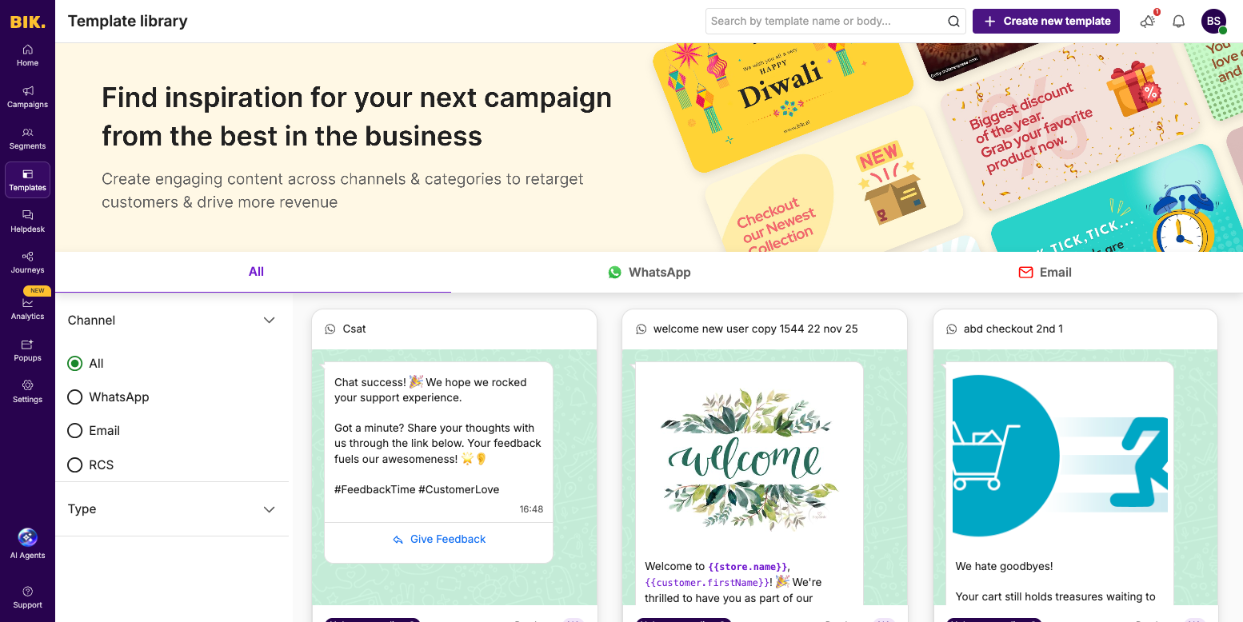
- Template library. Ready WhatsApp templates for common ecommerce flows, such as CSAT, welcome messages and abandoned checkout, which you can use as they are or edit.
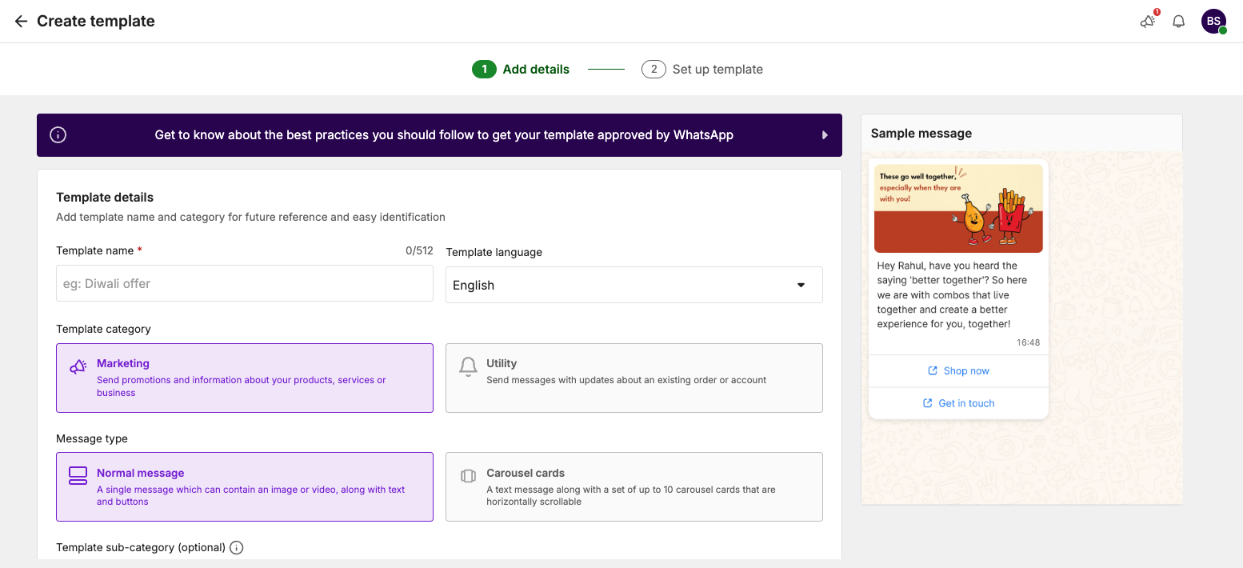
- Template builder. Choose Marketing or Utility, then a normal message or carousel cards (up to 10 cards), with a live preview and a link to Meta's approval best practices.
- Rejection reasons in the dashboard. Rejected templates show under My Templates; View details shows Meta's reason, and you can edit and resubmit from there.
- Fallback AI. If Meta pauses or restricts a template mid-campaign, BIK generates a compliant fallback, keeping your offer, codes, variables, media and buttons, submits it and resumes the campaign once approved.
- Opt-out by default. BIK adds a "Stop" WhatsApp template to accounts by default, and Fallback AI adds an opt-out button if a template lacks one.
BIK is a Meta Business Solution Provider and charges Meta's rate card at cost, with no markup, so a correctly categorized utility template costs you exactly Meta's utility rate. The template builder and Fallback AI above are part of the BIK platform, a subscription priced on unique contacts that starts at $250 per month with AI credits included. Brands that only need WhatsApp API access can use BIK's BSP (API-only) offering instead: $10 per WhatsApp number per month, a $0 platform fee and no markup; it does not include the platform. See an approved utility-style flow in action in Duroflex's in-store invoices on WhatsApp.
When another option fits better
- You manage templates through your own code. If your developers create and submit templates through the API, BIK's BSP (API-only) offering or a developer-focused provider may be enough.
- You only send OTPs. For authentication alone, a messaging API provider focused on verification may be simpler than a retention platform.
- Your audience is in the US. Meta does not currently deliver marketing templates to US numbers, so marketing template tooling adds little there.
80%+ of tickets automated, or your money back. That's the Manifest AI guarantee, written into your contract.
FAQ
Why was my WhatsApp template rejected?
The most common reasons are a variable at the start or end of the message, too many variables, non-sequential numbering, duplicate wording, the wrong category, or content that breaks WhatsApp's Business or Commerce policies. Your provider's dashboard or Business Support Home shows Meta's stated reason.
What is the difference between a marketing and a utility template?
Utility templates follow up on something the customer did, such as an order, and contain no promotion. Marketing templates cover anything promotional. If a template mixes the two, Meta treats it as marketing.
Is an abandoned cart message marketing or utility?
In most cases it is marketing, especially if it includes a discount, product recommendations or urgency. Submitting it as utility risks recategorization and, if repeated, penalties on your utility templates.
How long does WhatsApp template approval take?
Meta says decisions can take up to 24 hours, and many templates are reviewed within minutes. Appeals of rejected templates must include a sample and are also decided within 24 hours.
Can Meta change my template's category after approval?
Yes. Meta recategorizes approved utility templates it considers marketing, with one day's notice unless you have been warned before. You can request a review before the change, and have 60 days to appeal afterward.
Do I need a WhatsApp-specific opt-in?
No. Meta's rules say the opt-in can be general as long as it clearly names your business and states that the person agrees to receive messages, and complies with local law. Mentioning WhatsApp is still good practice.