.png)
BIK Product Update June'26
BIK June updates: Migrate from Zendesk with zero downtime, search helpdesk tickets by keyword, plus VoS Insights and WooCommerce support from Manifest AI - all shipped this month.
Welcome back to BIK – News, your monthly product update.
Switch platforms. Keep everything. Lose nothing.
This month we shipped features that remove the biggest reasons brands stay stuck on old tools like years of ticket history, siloed templates, and conversations you can never find again. Plus two more launches worth knowing about.
Let's dive in 👇
Zendesk → BIK Migration - Years of ticket history. Zero downtime. One move.
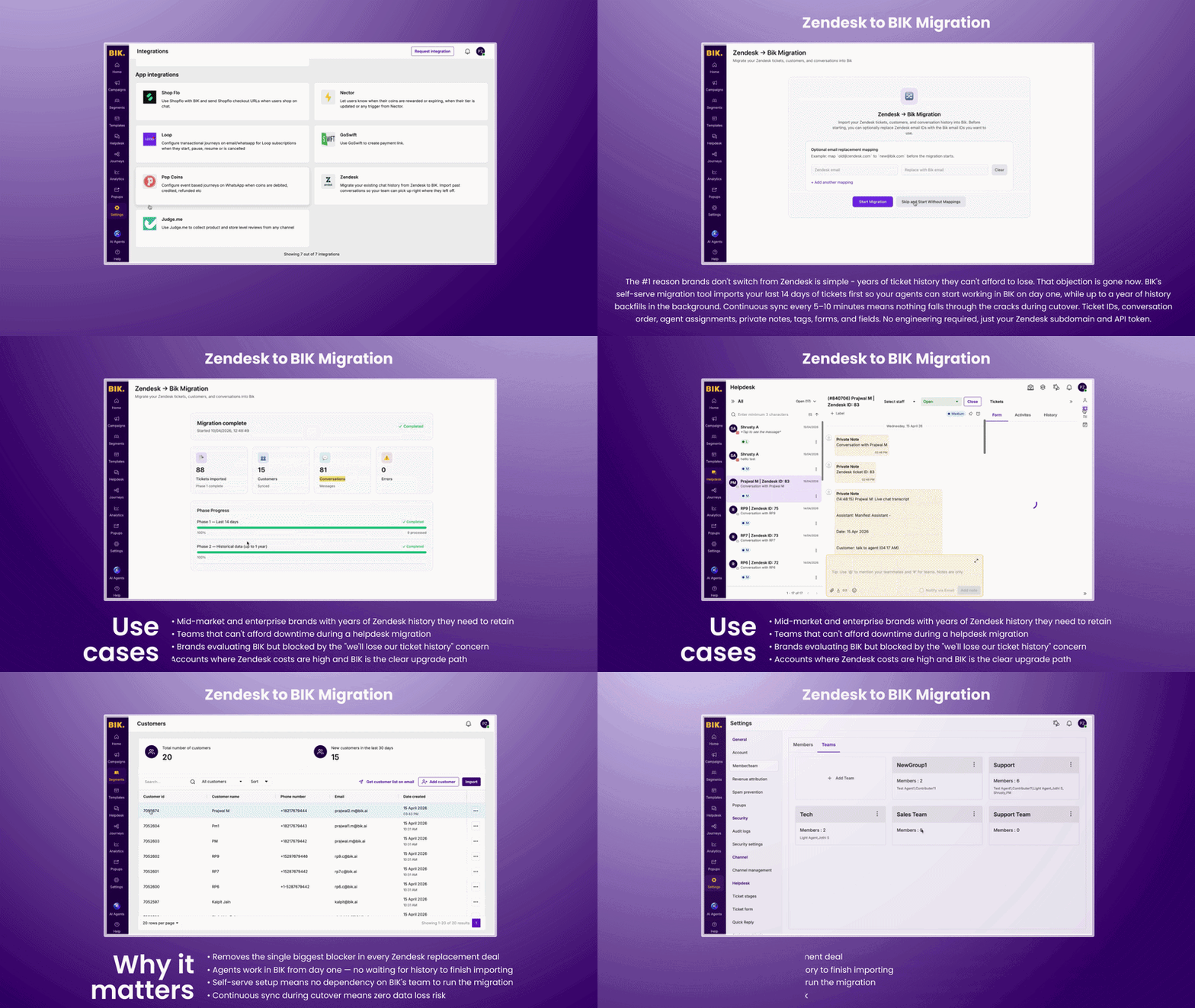
The #1 reason brands don't switch from Zendesk is simple, years of ticket history they can't afford to lose. That objection is gone now. BIK's self-serve migration tool imports your last 14 days of tickets first so your agents can start working in BIK on day one, while up to a year of history backfills in the background. Continuous sync every 5–10 minutes means nothing falls through the cracks during cutover. Ticket IDs, conversation order, agent assignments, private notes, tags, forms, and fields. No engineering required, just your Zendesk subdomain and API token.
Use cases:
- Mid-market and enterprise brands with years of Zendesk history they need to retain
- Teams that can't afford downtime during a helpdesk migration
- Brands evaluating BIK but blocked by the "we'll lose our ticket history" concern
- Accounts where Zendesk costs are high and BIK is the clear upgrade path
Why it matters:
- Removes the single biggest blocker in every Zendesk replacement deal
- Agents work in BIK from day one, no waiting for history to finish importing
- Self-serve setup means no dependency on BIK's team to run the migration
- Continuous sync during cutover means zero data loss risk
Keyword Search in Helpdesk - Find any conversation. In seconds.
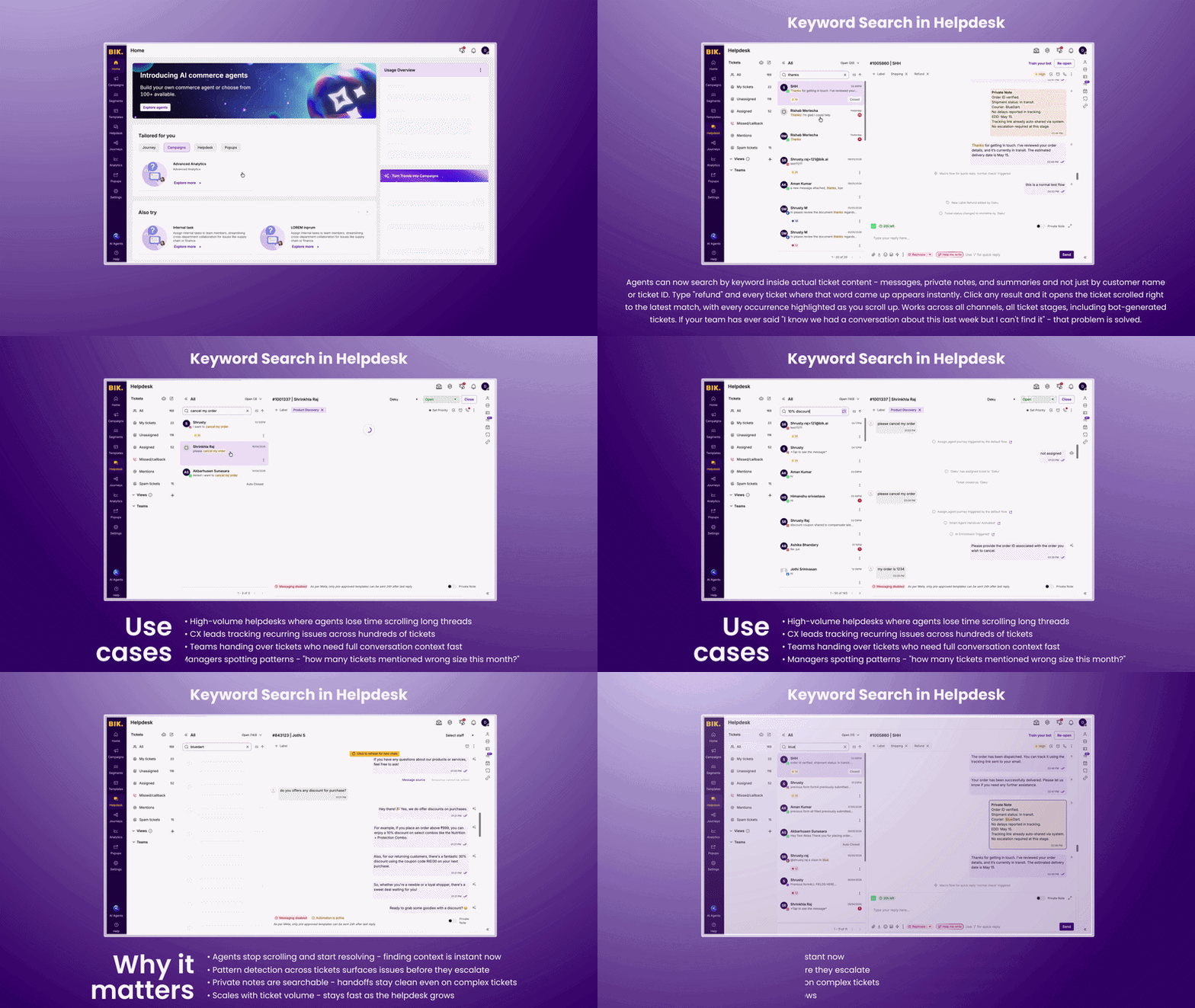
Agents can now search by keyword inside actual ticket content — messages, private notes, and summaries — not just by customer name or ticket ID. Type "refund" and every ticket where that word came up appears instantly. Click any result and it opens the ticket scrolled right to the latest match, with every occurrence highlighted as you scroll up. Works across all channels, all ticket stages, including bot-generated tickets. If your team has ever said "I know we had a conversation about this last week but I can't find it" — that problem is solved.
Use cases:
- High-volume helpdesks where agents lose time scrolling long threads
- CX leads tracking recurring issues across hundreds of tickets
- Teams handing over tickets who need full conversation context fast
- Managers spotting patterns — "how many tickets mentioned wrong size this month?"
Why it matters:
- Agents stop scrolling and start resolving — finding context is instant now
- Pattern detection across tickets surfaces issues before they escalate
- Private notes are searchable — handoffs stay clean even on complex tickets
- Scales with ticket volume — stays fast as the helpdesk grows
Voice of Shoppers Insights - Your bot was talking to customers. Now it tells you what they said.
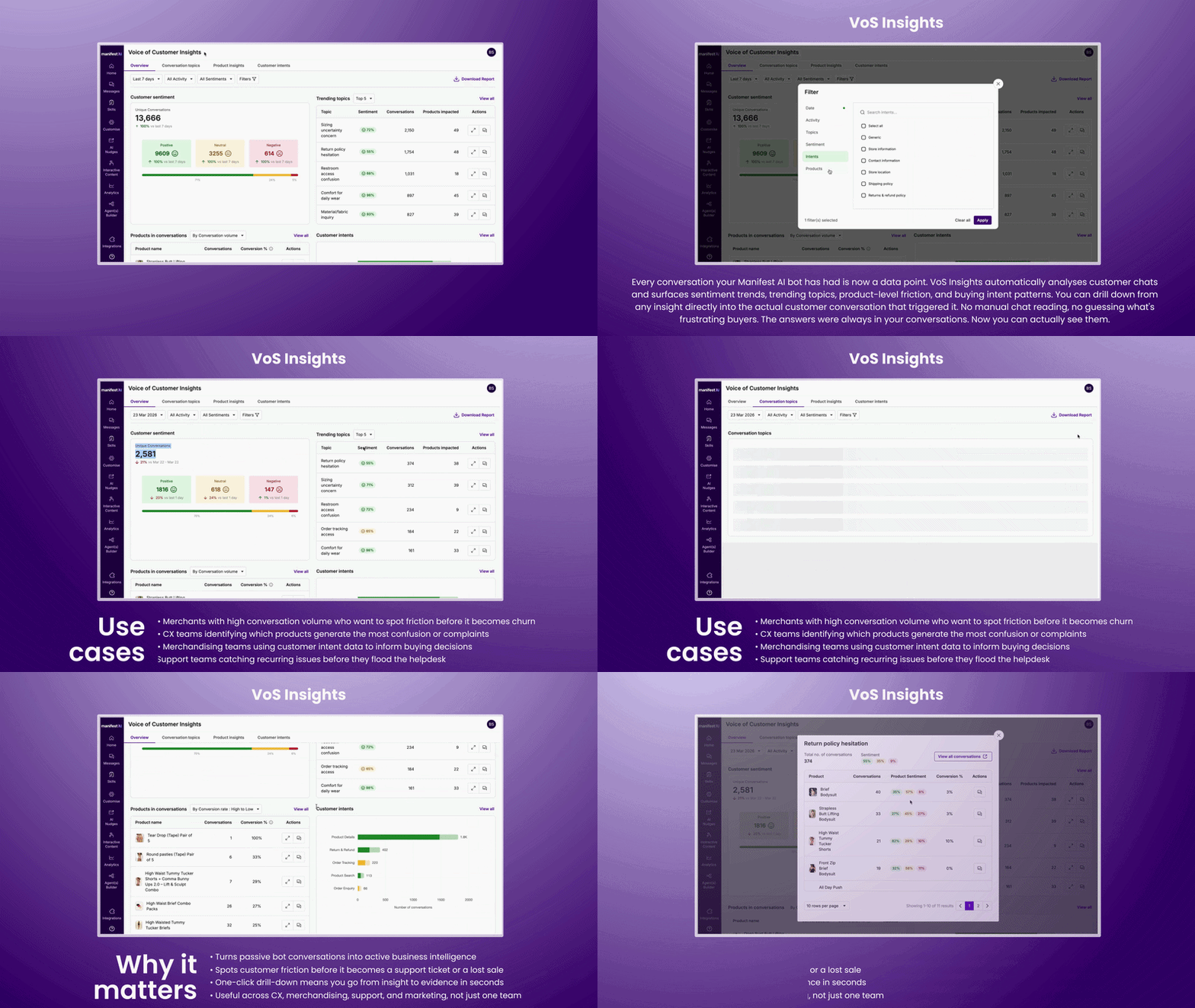
Every conversation your Manifest AI bot has had is now a data point. VoS Insights automatically analyses customer chats and surfaces sentiment trends, trending topics, product-level friction, and buying intent patterns — all in one dashboard. Drill down from any insight directly into the actual customer conversation that triggered it. No manual chat reading, no guessing what's frustrating buyers. The answers were always in your conversations. Now you can actually read them.
Use cases:
- Merchants with high conversation volume who want to catch friction before it becomes churn
- CX teams identifying which products generate the most confusion or complaints
- Merchandising teams using customer intent data to inform buying decisions
- Support teams spotting recurring issues before they flood the helpdesk
Why it matters:
- Turns passive bot conversations into active business intelligence
- Spots customer friction before it becomes a lost sale or a support ticket
- One-click drill-down means you go from trend to evidence in seconds
- Useful across CX, merchandising, support, and marketing
WooCommerce Support - Manifest AI is platform agnostic now.
Manifest AI now works natively on WooCommerce. WooCommerce store owners can sync their product catalogue to Manifest AI and deploy the assistant directly on their website — same setup, same AI, different platform. In the meantime, it can be configured via a REST API flow. If you've been holding off on Manifest AI because you're not on Shopify, that reason no longer exists.
Use cases:
- WooCommerce brands that want AI-powered product discovery and chat on their store
- Merchants running both Shopify and WooCommerce storefronts
- Agencies managing WooCommerce client stores looking to add Manifest to their stack
- Brands migrating from Shopify to WooCommerce who don't want to lose Manifest AI
Why it matters:
- Opens Manifest AI to an entirely new merchant base beyond Shopify
- WooCommerce powers over 30% of eCommerce stores globally - this is a big unlock
- Same Manifest experience, zero re-learning for merchants already familiar with the product
More launches this month
WhatsApp Template Sync for MoEngage & CleverTap
Create WhatsApp templates on BIK and sync them to MoEngage or CleverTap automatically and no more recreating the same template across platforms.
WhatsApp E2E Checkout for Non-Shopify Brands
Non-Shopify stores can now run end-to-end WhatsApp checkout flows. Full integration guide and updated documentation live at docs.bik.ai.
Smart User Inputs
Manifest AI now shows structured input fields inside chat — email, phone, OTP, single and multi-select. Shoppers tap instead of type. Works across all flows, enabled by default.
👋 That’s a wrap
You made it to the end - you’re now 5x more AI-savvy than you were 5 minutes ago. Got feedback? Send us an email at support@bik.ai, we read every single message.
Until next time,
BIK Team