.png)
How to Sell on WhatsApp: Checkout, Catalogue, Loyalty and CRM (2026)
A step-by-step guide to selling on WhatsApp in 2026: sync your Shopify catalogue, run checkout and payments inside the chat, use WhatsApp as a CRM and send loyalty points and expiry reminders where customers read them.
Short answer: To sell on WhatsApp you need four pieces: a product catalogue synced from your store, a way for customers to check out and pay inside the chat, a CRM that knows each customer's orders, and retention flows such as loyalty reminders. You need the WhatsApp Business Platform (API) and a provider for this, not the free WhatsApp Business app. BIK connects all four for Shopify brands: it syncs your Shopify catalogue to WhatsApp, runs end-to-end checkout with COD or Razorpay payment links, keeps one customer profile and triggers loyalty messages from tools such as Nector.

Most brands start selling on WhatsApp by sending a website link and hoping the customer finishes on the site. That works, but every redirect is a chance to drop off. This guide walks through how selling on WhatsApp actually works in 2026, step by step: the catalogue, checkout, payments, CRM and loyalty, with what each costs and which pieces you can automate.
Can you sell on the WhatsApp Business app, or do you need the API?
The free WhatsApp Business app lets a small shop list products and chat with customers from one phone. It is fine for a home business taking a handful of orders a day. It cannot run automated flows, connect to Shopify in real time, support a team of agents or send campaigns to opted-in customers at scale.
For an ecommerce brand, selling on WhatsApp means the WhatsApp Business Platform, accessed through a Business Solution Provider (BSP) such as BIK. Messages you start are template messages, billed per delivery by Meta by category (marketing, utility, authentication). Replies inside the 24-hour customer service window are service messages; from 1 October 2026 these are charged at the utility rate after 1,000 free per business number per month. Conversations that start from a Click-to-WhatsApp ad or a Facebook Page button stay free during the free entry point window, which makes ads a cheap way to open a sales chat. More: WhatsApp service message pricing from October 2026.
| Capability | WhatsApp Business app | WhatsApp Business Platform with BIK |
|---|---|---|
| Product catalogue | Manual listing on one phone | Shopify catalogue synced to WhatsApp through a Meta catalogue |
| Checkout | Customer messages, you confirm by hand | Cart, address, discount, bill and payment inside the chat |
| Payments | Share a payment link manually | COD or a Razorpay payment link generated in the flow |
| Team | Limited devices | Shared helpdesk with agents, labels and AI tools |
| Automation | Greeting and away messages | Journeys triggered by store, loyalty and payment events |
| Campaigns | Broadcast lists with limits | Segmented campaigns with retries, frequency caps and quiet hours |
Step 1: Put your catalogue on WhatsApp
WhatsApp's native shopping experience runs on a Meta (Facebook) catalogue connected to your WhatsApp Business Account. Customers browse products and add items to a WhatsApp cart without leaving the chat.
For a Shopify store, the work is keeping that catalogue in sync. In BIK you connect the catalogue from Settings, Channel management, WhatsApp, and BIK syncs your Shopify catalogue to Facebook to power the WhatsApp catalogue. Practical controls from BIK's help centre:
- Out-of-stock products can be removed from the WhatsApp catalogue automatically.
- Hidden products: add the tag bik-hide on Shopify to keep items, such as free gifts, out of the WhatsApp catalogue.
- Sync: the catalogue syncs regularly at a 24-hour interval, with a manual sync button and stats for available, deleted and invalid items.
- Store icon: you can switch on the shop icon in your WhatsApp profile.
- Large catalogues are handled with BIK's team beyond the default limits.
Inside messages, BIK journeys can send a single-product catalogue message, a multi-product catalogue message, a product card, or a cart summary. Use multi-product messages for collections ("new arrivals under ₹1,999") and single-product messages for price-drop and back-in-stock alerts. Carousel templates with up to 10 cards work well for campaigns.
Selling on WhatsApp? Manifest AI and BIK turn WhatsApp conversations into orders, with AI agents that answer questions, recommend products and recover carts.
Step 2: Let customers check out inside WhatsApp
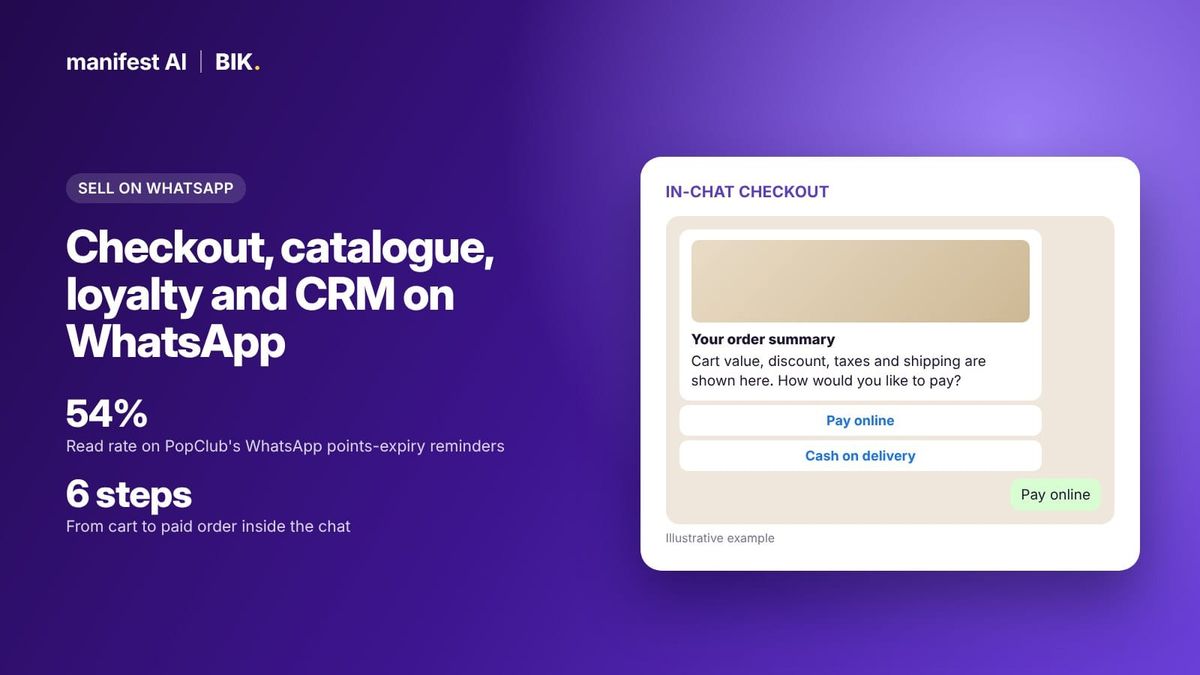
WhatsApp checkout is where most "sell on WhatsApp" setups stop short. BIK's End-to-End Checkout on WhatsApp lets customers browse and pay entirely inside the chat. Per BIK's help article, the flow runs like this:
- Add to cart. The customer adds products from the WhatsApp catalogue and sends the cart to the business.
- Choose how to check out. BIK asks whether the customer wants a checkout link or to check out in the chat. You can switch the link option on or off.
- Address. For returning customers, BIK suggests the address saved in Shopify, matched on phone number (default address first, then the last updated one). New customers type their address and pin code, and BIK fills in city and state. Customers can edit the address in chat.
- Payment method. The customer picks cash on delivery or prepaid.
- Bill. A WhatsApp bill shows cart value, discount, taxes and shipping.
- Order placed. COD customers confirm; prepaid customers pay on a Razorpay payment link, and the order is created.
Setup needs a Shopify store connected to BIK and Razorpay added for prepaid orders. You enable three flows from the journey library (browse products, end-to-end checkout with or without discount, and payment confirmation), then set the discount block (percentage or fixed amount) and a shipping charge. All message content is editable. If you prefer a fast-checkout page, BIK can send a Shopflo checkout link instead, and it integrates with fast-checkout partners in India including GoKwik, Razorpay Magic, Zecpe, Xpresslane and GoSwift.
COD confirmation and COD-to-prepaid
For Indian D2C brands, the order is not safe until COD is confirmed. BIK's COD and address confirmation flow sends a confirmation message after purchase, tags the order on Shopify when the customer confirms, lets them correct the address until the item ships, and offers a payment link to convert COD to prepaid, with a maximum discount you set. Cancellations are tagged on Shopify with the reason captured in notes.
Step 3: Run WhatsApp as a CRM, not a phone
Selling on WhatsApp at scale means every agent and every automation needs the same view of the customer. A WhatsApp CRM for ecommerce should show, in the chat:
- The customer's Shopify details: total orders, total spent, customer since, and full order history with tracking links.
- Tags, custom fields and the campaigns or journeys the customer has received.
- Tools to share products and collections and generate checkout links with custom discounts and shipping options from the inbox.
BIK's helpdesk shows all of this in the right-hand panel, with AI tools to rephrase, draft replies and summarise conversations, AI labels and spam filtering, and rules to escalate from AI to a human based on intent, sentiment, trigger phrases or conversation length. Because it is the same customer profile used by campaigns, segments can use order value, location, products bought and message history.
Two AI features close sales without an agent. The Campaign Sales Agent replies to customers who respond to a WhatsApp campaign, using the campaign's context to answer questions and handle objections. The Voice Agent calls customers who abandon checkout to recover the order. On Instagram, Price Please automation sends a product card by DM when someone comments "PP".
Step 4: Bring loyalty into WhatsApp
A WhatsApp loyalty program does not mean building a new points system. It means sending the points, rewards and expiry reminders your loyalty tool already tracks to the channel customers actually read.
BIK integrates with Nector. Nector events such as reward points added to a wallet, referral activity and review actions can trigger BIK journeys, and a "Call Custom API" block can pull a customer's Nector coin balance into any message, condition or action. That lets you add the coin balance to an order confirmation or a replenishment reminder.
Case: PopClub. PopClub, Razorpay's loyalty product, had members whose POPcoins were expiring unused, and email reminders were not getting through. BIK builds the WhatsApp templates for the expiry reminder, showing the balance and an offer, while MoEngage handles segmentation and timing. Over the measurement window, 51.3K reminders were sent and 27.8K were read, a 54% read rate. The post does not report redemptions. Read how PopClub encourages members to spend their loyalty points before they expire.
Timing matters as much as content. One coffee brand waits three hours after an order before announcing loyalty coins so the message does not compete with order and payment updates.
See what your brand could automate. Our team builds the agents for you, and most brands are live in about 2 weeks.
A simple WhatsApp selling playbook
| Stage | WhatsApp message | Category |
|---|---|---|
| Discover | Click-to-WhatsApp ad opens a chat with a product carousel | Free during the free entry point window |
| Browse | Multi-product catalogue message for the collection asked about | Service reply inside the window |
| Buy | In-chat checkout with address suggestion, bill and Razorpay link or COD | Service and utility |
| Confirm | COD confirmation and COD-to-prepaid offer | Utility |
| Recover | Abandoned cart message, cancelled if the order arrives | Marketing |
| Retain | Loyalty points credit, expiry reminder, replenishment | Marketing |
What this costs per message in India, at Meta's October 2026 base rates per third-party summaries of Meta's rate card: ₹0.8631 for each marketing message (abandoned cart, loyalty reminders) and ₹0.115 for each utility message (COD confirmation, order updates) and each service reply after the free 1,000 a month. So 10,000 abandoned cart reminders cost about ₹8,631 in Meta fees, and 10,000 COD confirmations about ₹1,150. Providers that add a markup charge more than this; BIK passes Meta's rate through at cost. Check how GST applies with your provider.
How BIK runs WhatsApp selling end to end
- Pricing: BIK's standard plans, built for established brands doing about ₹1 crore or more in monthly revenue, start at $250 per month on unique contacts, with AI credits included; 100,000 contacts is $300 per month. WhatsApp messages are charged at Meta's rate card with no markup. Smaller brands can start on BIK's startup plan, and there is a 14-day free trial on Shopify. Brands that only need WhatsApp API access can use BIK as a BSP instead: $10 per WhatsApp number per month, no platform fee, no markup.
- Setup: migration from any provider is included, a growth manager sets up 30+ flows, and every client gets a dedicated WhatsApp group with the BIK team.
- Reliability: Smart Retry resends failed campaign messages, Fallback AI replaces paused templates and WhatsApp Warm-up helps you raise your messaging limit.
- Proof: LEGO India built a WhatsApp gift quiz for people who do not know LEGO, and every Duroflex store has its own QR code and WhatsApp conversation. BIK is rated 4.9 from 139 reviews on the Shopify App Store (October 2026).
When BIK is not the right fit
- You take a few orders a day. The free WhatsApp Business app and manual payment links are enough.
- You are not on Shopify and have no developer. BIK's in-chat checkout requires Shopify; other stores can connect through BIK's Event APIs, but that needs engineering work.
- You only want a catalogue and a basic inbox, with no retention programme. A simple inbox tool such as Zoko or Interakt covers that. Smaller brands that want checkout and retention flows can start on BIK's startup plan.
- Your payment provider is not Razorpay. Prepaid in-chat checkout in BIK uses Razorpay; check whether a fast-checkout link from your existing partner meets your needs.
80%+ of tickets automated, or your money back. That's the Manifest AI guarantee, written into your contract.
FAQ
How do I sell on WhatsApp as an ecommerce brand?
Connect your store to a WhatsApp Business Platform provider, sync your product catalogue to WhatsApp, set up a checkout flow with payments, and add automations for abandoned carts, order updates and loyalty. Use Click-to-WhatsApp ads to start sales chats cheaply.
Can customers pay inside WhatsApp?
With BIK's end-to-end checkout, customers build a cart, confirm their address, see a bill and then pay on a Razorpay payment link or choose cash on delivery, all from the chat. The order is then created in Shopify.
How do I add my Shopify catalogue to WhatsApp?
Your Shopify products need to sit in a Meta catalogue connected to your WhatsApp Business Account. BIK does this from its WhatsApp channel settings, syncs every 24 hours, removes out-of-stock items if you choose and hides products tagged bik-hide.
What is the best WhatsApp CRM for ecommerce?
One that shows store data in the chat and shares the customer profile with your campaigns. BIK's helpdesk shows Shopify orders, spend and tracking links next to the conversation and lets agents send products and checkout links with discounts.
How do I run a loyalty program on WhatsApp?
Keep your loyalty engine, and send its events to WhatsApp. BIK triggers journeys from Nector events such as points credited or referrals, and can show a customer's coin balance in any message. Expiry reminders are the classic high-value flow.
Is selling on WhatsApp free?
The app is free, but the Business Platform charges per template message by category and country. From 1 October 2026, service replies are also charged after 1,000 free per number per month. Ad-started chats stay free during the free entry point window.